Comtech EF Data MIDAS Version 4.X Basic Configuration Manuale Utente Pagina 79: Aloha Parameters
 1
 2
 3
 4
 5
 6
 7
 8
 9
 10
 11
 12
 13
 14
 15
 16
 17
 18
 19
 20
 21
 22
 23
 24
 25
 26
 27
 28
 29
 30
 31
 32
 33
 34
 35
 36
 37
 38
 39
 40
 41
 42
 43
 44
 45
 46
 47
 48
 49
 50
 51
 52
 53
 54
 55
 56
 57
 58
 59
 60
 61
 62
 63
 64
 65
 66
 67
 68
 69
 70
 71
 72
 73
 74
 75
 76
 77
 78
 79
 80
 81
 82
 83
 84
 85
 86
 87
 88
 89
 90
 91
 92
 93
 94
 95
 96
 97
 98
 99
 100
 101
 102
 103
 104
 105
 106
 107
 108
 109
 110
 111
 112
 113
 114
 115
 116
 117
 118
 119
 120
 121
 122
 123
 124
 125
 126
 127
 128
 129
 130
 131
 132
 133
 134
 135
 136
 137
 138
 139
 140
 141
 142
 143
 144
 145
 146
 147
 148
 149
 150
 151
 152
 153
 154
 155
 156
 157
 158
 159
 160
 161
 162
 163
 164

MIDAS 4.2 Basic Configuration, Rev. 1
Setup and Operation
2–45
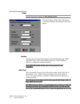
Modem Type
This drop-down box allows the operator to select the type of traffic modem
that will be used for the channel.
Priority
This option group allows the operator to select the channel’s priority status
(
High
, or
Normal
), by selecting the appropriate button.
Modem Capability Options
High Power
This checkbox enables/disables the High Power option for the selected modem
type. If a modem does not have the high power option, there will be no change
to the power output that was previously selected.
Table 2-1. Modem Power Ranges
Standard Range
High Power Range
Modem Type
Min
Max
Min
Max
SDM-100
-30.0
-5.0
-20.0
+5.0
SDM-150
-30.0
-5.0
-20.0
+5.0
SDM-300/300A
-30.0
-5.0
-20.0
+5.0
SDM-6000
-30.0
-5.0
-20.0
+5.0
SDM-8000
-30.0
-5.0
-20.0
+5.0
SNM-1010
-30.0
-5.0
-20.0
+5.0
SDM-300L
-40.0
0.0
-40.0
0.0
SDM-1010L
-40.0
0.0
-40.0
0.0
CDM-550
-20.0
0.0
-20.0
0.0
CDM-550T
-20.0
0.0
-20.0
0.0
CDM-600
-20.0
0.0
-20.0
0.0
CiM-550
-20.0
0.0
-20.0
0.0
Reed-Solomon
This allows the operator to enable/disable the Reed-Solomon function.
Directory Number
This (Display Only) portion of the Channel Details window allows the
operator to view the Directory Numbers that are associated with the currently
selected Channel.
Default Gateway/Destination
This drop-down box allows the operator to select the Default (a Directory
Number that is associated with a Hunt Group).
File PDF · ·
Domande su Comtech EF Data MIDAS Version 4.X Basic Configuration
Non ci sono ancora domande su questo manuale. Fate la prima.
Prodotti e manuali riguardanti Apparecchiature Comtech EF Data MIDAS Version 4.X Basic Configuration
- Apparecchiature Comtech EF Data MIDAS Transmit and Receive Levels Manuale Utente
 (14 pagine)
- Apparecchiature Comtech EF Data MIDAS Site Survey Report Manuale Utente
(64 pagine)
- Apparecchiature Comtech EF Data MIDAS 4 System and Design Manuale Utente
(126 pagine)
- Apparecchiature Comtech EF Data Ku-Band Power Amplifier with Optional L-Band Manuale Utente
(34 pagine)
- Apparecchiature Comtech EF Data turboIP-45 Manuale Utente
(108 pagine)
- Apparecchiature Comtech EF Data turboIP v4.0 Manuale Utente
(114 pagine)
- Apparecchiature Comtech EF Data CRS-100 Manuale Utente
(38 pagine)
- Apparecchiature Comtech EF Data CiM-25/9000 Manuale Utente
(134 pagine)
- Apparecchiature Comtech EF Data CRS-120 Manuale Utente
(44 pagine)
- Apparecchiature Comtech EF Data CRS-170 Manuale Utente
(34 pagine)
- Apparecchiature Comtech EF Data SPOD PS 1, PS 1.5, and PS 2 C-, X-, or Ku-Band Manuale Utente
(194 pagine)
- Apparecchiature Comtech EF Data D&I Manuale Utente
(24 pagine)
- Apparecchiature Comtech EF Data CRS-200 REDUNDANCY SWITCH Manuale Utente
(60 pagine)
- Apparecchiature Comtech EF Data CRS-400 Manuale Utente
(96 pagine)
- Apparecchiature Comtech EF Data CRS-200 Manuale Utente
(76 pagine)
- Apparecchiature Comtech EF Data RSU-503 Manuale Utente
(74 pagine)
- Apparecchiature Comtech EF Data RC-1160 Manuale Utente
(68 pagine)
- Apparecchiature Comtech EF Data SMS-451 Manuale Utente
(62 pagine)
- Apparecchiature Comtech EF Data MiniMac Installation ManualOperation Manual Operat Manuale Utente
(140 pagine)
- Apparecchiature Comtech EF Data MiniMAC Operation ManualOperation Manual Operation Manuale Utente
(216 pagine)